
Uber Iris PRO - Photo Filters2.1.0 - Google Play
You'll be able to see results in few seconds.
Publisher Description
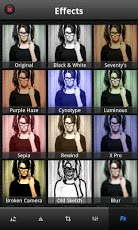
The all new avatar of Uber Iris comes loaded with awesome features you always wish you had. Now you can not just apply awesome photo effects and filters to your photos with Uber Iris but do a lot more than that with Overlays, Frames, Layouts, Borders, Stickers and a Meme Generator! Convert your device into a pro photo studio by applying more than 50 different photo filters and effects to your photos!
Features:
★ Photo Edits - Crop, Rotate, Adjust & Flip
★ Overlays
★ Layouts
★ Frames - Birthday, Christmas, Valentines Day etc.,
★ Stickers - A whole lot of Ultra Cool Stickers for Birthdays and more.
★ More than 70+ Stunning Photo Filters
★ Meme Generator
Editors' Pick By AppEggs.com!!
Uber Iris is a photo editor for Android that lets you effortlessly add gorgeous and funky Instagram - like effects and filters to your photos. Pick from a wide range of filters, effects and other adjustments, apply them to your photos and watch them transform into uber cool works of art. And what’s more, you can also proudly display them on your Facebook, Twitter and Flickr pages!
This photo editor includes:
★ Extremely smooth and user-friendly interface which allows for quick photo editing.
★ Take a photo from within the app or import photos from your camera roll and edit them on the move. Go crazy with your camera!
★ Choose from over 50 awesome effects and filters to make your photos look artistic and stunning
★ Sliders to finely control each effect/filter and style strength
★ Use this photo editor to apply multiple photo effects and filters to the same photo to get interesting effects
★ This photo editor has photo editing tools like crop, rotate, flip and adjustments for brightness, hue etc
★ Save your masterpieces on your camera roll or share them with friends and family via Facebook, Twitter and Flickr
Grab your Android Camera and apply these amazing photo filters and effects:
✓ Black & White
✓ Contrast
✓ Grayscale
✓ Sharpen
✓ Sepia
✓ Sobel Edge Detection
✓ Three X Three Convolution
✓ Filter Group
✓ Color Emboss
✓ Posterize
✓ Gamma
✓ Brightness
✓ Invert
✓ Hue
✓ Pixelation
✓ Saturation
✓ Exposure
✓ Highlight Shadow
✓ Monochrome
✓ Opacity
✓ RGB
✓ White Balance
✓ Vignette
✓ Tone Curve
✓ Blend Chroma Key
✓ Lookup Amatorka
✓ Gaussian Blur
✓ Crosshatch
✓ Box Blur
✓ VGA Colorspace
✓ Dilation
✓ RGB Dilation
✓ Sketch
✓ Toon
✓ Smooth Toon
✓ Bulge Distortion
✓ Glass Sphere
✓ Haze
✓ Laplacian
✓ Non Maximum Suppression
✓ Sphere Refraction
✓ Swirl
✓ Weak Pixel Inclusion
✓ False Color
✓ Color Balance
✓ Levels Filter Min
✓ 70's
✓ Purple Haze
✓ Cyanotype
✓ Luminous
✓ Rewind
✓ X Pro
✓ Broken Camera
✓ Old Sketch
✓ Blur
✓ Photocopy
✓ Color Halftone
✓ Sandpaper
✓ Noir
✓ Motion Blur
✓ Solarize
✓ 8-Bit
✓ Diffuse
✓ Threshold
✓ Glow
✓ Bump
✓ Diffusion
✓ Tint
✓ Engrave
✓ Scanlines
✓ Color Sketch
✓ Emboss
✓ Crystallize
Photo Editing Tools:
★ Rotate: Rotate your photos both clockwise & anticlockwise
★ Flip: Flip your photo in any direction using this photo editor
★ Crop: Choose from a range of crop options; Freeform, Golden Ratio, Square & others
★ Adjustments: Fine-tune your pictures by adjusting the Brightness, Contrast, Saturation and Hue
Get this photo editor now and start clicking with your Android camera! If you enjoy Uber Iris +1 us on Google!
About Uber Iris PRO - Photo Filters
The company that develops Uber Iris PRO - Photo Filters is XLabz Technologies Pvt Ltd. The latest version released by its developer is 2.1.0.
To install Uber Iris PRO - Photo Filters on your Android device, just click the green Continue To App button above to start the installation process. The app is listed on our website since 2016-12-02 and was downloaded 0 times. We have already checked if the download link is safe, however for your own protection we recommend that you scan the downloaded app with your antivirus. Your antivirus may detect the Uber Iris PRO - Photo Filters as malware if the download link to com.xlabz.UberIris is broken.
How to install Uber Iris PRO - Photo Filters on your Android device:
- Click on the Continue To App button on our website. This will redirect you to Google Play.
- Once the Uber Iris PRO - Photo Filters is shown in the Google Play listing of your Android device, you can start its download and installation. Tap on the Install button located below the search bar and to the right of the app icon.
- A pop-up window with the permissions required by Uber Iris PRO - Photo Filters will be shown. Click on Accept to continue the process.
- Uber Iris PRO - Photo Filters will be downloaded onto your device, displaying a progress. Once the download completes, the installation will start and you'll get a notification after the installation is finished.
Program Details
System requirements
Download information
Pricing
Version History
version 2.1.0
posted on 2016-12-02
Bug Fixes and Improvements.
version 1.1.1
posted on 2013-04-23
Several fixes and updates
Disclaimer
Official Google Play Link
We do not host Uber Iris PRO - Photo Filters on our servers. We did not scan it for viruses, adware, spyware or other type of malware. This app is hosted by Google and passed their terms and conditions to be listed there. We recommend caution when installing it.
The Google Play link for Uber Iris PRO - Photo Filters is provided to you by apps112.com without any warranties, representations or guarantees of any kind, so access it at your own risk.
If you have questions regarding this particular app contact the publisher directly. For questions about the functionalities of apps112.com contact us.
